



The best currency converter app for travel is usually not the most complex one. It is the one that helps you understand a price in a few seconds, works when your signal is weak, and does not get in your way when you are tired, rushed, or standing at a checkout.
For most travelers, that means choosing a simple, offline-friendly currency app over a feature-heavy finance tool. If you also send money internationally, track rates before a trip, or compare providers, a broader app like Wise or XE can make more sense. Wise’s converter app emphasizes live rates, favorites, historic changes, and provider comparison, while Travel Currency Converter and other offline-first tools focus on fast travel use.
What is a currency converter app?
A currency converter app is a tool that shows how much one currency is worth in another. You enter an amount, pick two currencies, and the app gives you the converted value using recent exchange-rate data.
In real life, that means simple questions like these:
How much is this dinner in my own currency?
Is this taxi fare reasonable?
Should I pay in the local currency or accept the terminal’s conversion?
Is the airport exchange desk offering a fair rate?
That is why a good travel converter is less about “finance” and more about clarity under pressure.
Why does a currency converter app matter when you travel?
A good converter removes hesitation. It helps you make faster decisions when everything around you is unfamiliar.
It matters most when:
You are traveling to a country with a currency you do not know well.
You are moving between multiple countries on the same trip.
You are comparing card payments, cash exchange, and ATM withdrawals.
You need quick price context in markets, taxis, stations, or airports.
It matters less when:
you already know the price level well
you are staying in one place for a long time
you rarely handle cash
you are not comparing rates at all
Which currency converter apps are best for travel in 2026?
The short answer is this: the best app depends on the kind of trip you are taking.
1. Which app is best if you want a clean, travel-first tool?
A travel-first converter is often the best choice for direct download intent. These apps are built around one job: helping you check prices fast.
Examples include apps that explicitly highlight offline travel use, quick swap, and simple calculator-style input. Travel Currency Converter describes itself as a fast offline currency converter for travel and everyday use, with 150+ currencies and quick swap. Travel Money Converter also positions itself around offline conversion during trips, shopping, and airport travel.
This kind of app is usually best if you want:
offline access
quick number entry
less clutter
a simple travel utility
2. Which app is best if you also care about rate tracking?
If you like to watch rates before a trip, a broader app can be useful. Wise’s Currency Converter app focuses on live exchange rates, favorites, historic changes, and provider comparison.
This makes it a better fit if you:
track rates before travel
compare providers
want more context than a simple calculator gives you
It is less ideal if your only goal is a fast “How much is this coffee?” check.
3. Which app is best if you want conversion plus transfers?
Some travelers want both. XE is widely known for currency conversion and also operates as a money transfer product, which makes it a better fit for people who move money across borders, not just compare prices while traveling. Wise also overlaps with this use case through provider comparison and conversion-related cost visibility.
This type of app is useful when:
you travel often
you work internationally
you move money between currencies regularly
But it can feel heavier than necessary for everyday tourist use.
Currency converter app vs transfer app: what is the difference?
A currency converter app helps you understand value. A transfer app helps you move money.
Here is the difference in practical terms:
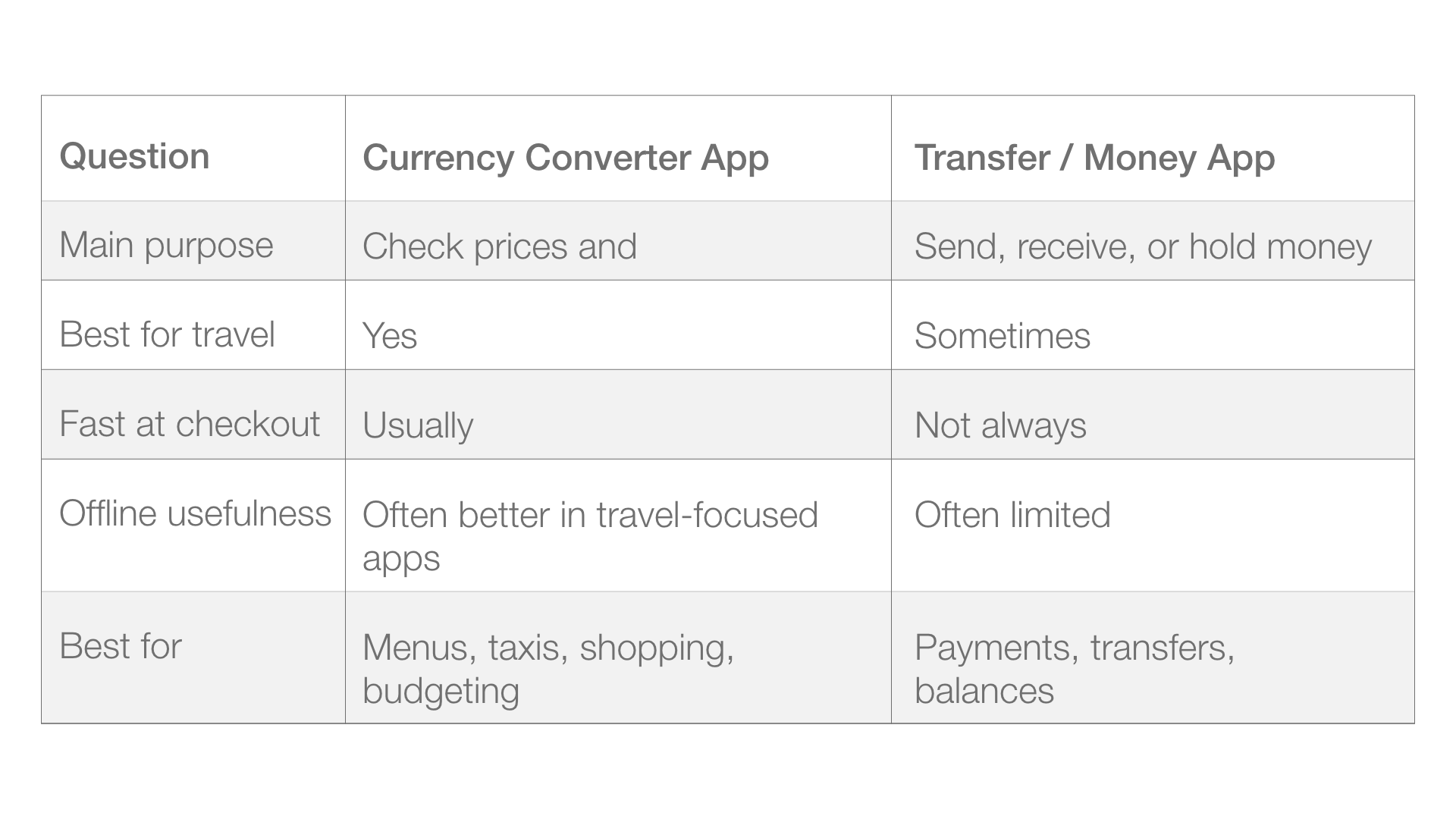
Some apps sit in the middle. Wise is a good example because it combines conversion, provider comparison, and broader money features.
What should a good currency converter app include?
The best travel apps are usually simple. That is not a weakness. It is the point.
Look for these features first:
offline mode
fast input
saved currency pairs
clear rate display
easy swap
low visual clutter
reliable updates when online
Apps that explicitly promote offline use tend to be better aligned with travel utility. Several App Store listings currently position themselves around offline conversion, including Travel Currency Converter, Travel Money Converter, Simple: Currency Converter, and other offline-first converter apps.
How should you choose the right currency converter app?
Choose the app based on the decision you need to make most often. This is where many travelers get it wrong.
Step 1: Ask what you actually need
If you only want to check prices, choose a simple converter. If you also send money, compare providers, or track rate changes, choose a broader app.
Step 2: Check whether it works offline
This matters more than many people expect. Airport Wi-Fi fails. Roaming can be expensive. Rural coverage can be weak. Underground transport can cut your signal completely.
Step 3: Save your common currencies
Most people repeat the same pairs. Your home currency, your destination currency, and sometimes a backup like EUR or USD are usually enough.
Step 4: Test it before the trip
Open the app. Turn off Wi-Fi. Try a few conversions. A five-minute test before departure is more useful than reading ten feature lists.
Step 5: Keep it on your home screen
A travel app only helps if it is easy to reach.
What is a common mistake when choosing a currency app?
The most common mistake is downloading a finance app when what you really need is a travel tool.
Other common mistakes include:
ignoring offline support
choosing a cluttered interface
caring only about brand name
assuming all converter apps feel the same in daily use
forgetting that the app rate and the final card or ATM rate may differ
That last point matters. A converter gives you context, not always the exact final amount after fees or markups.
Which real travel scenarios make a currency converter app useful?
This is where the category becomes very practical.
Restaurant menu
You want to know whether a dinner is normal, expensive, or a tourist trap. A quick converter gives you price context in seconds.
Taxi or ride fare
You are tired, it is late, and you do not want to do mental math. A good app removes friction.
Cash exchange desk
You compare the posted rate to what you expected. Even a rough check can stop you from making a bad exchange decision.
Market or souvenir shopping
This is where offline mode becomes surprisingly important. Local shops, outdoor markets, and transit-heavy travel days are exactly where signal can fail.
Which approaches sound good but fail in real life?
Some choices look smart before the trip and become annoying once the trip starts.
“I’ll just use Google”
This works until it does not. It is slower, depends on signal, and is less convenient for repeated use.
“My banking app is enough”
Sometimes it is. But many banking apps are not built for fast price checks during travel.
“The most advanced app must be the best”
Not always. For travel, the best app is often the calmest and quickest one.
“Offline mode is optional”
It feels optional right up until the moment you need it.
Which apps are worth looking at first?
If you want a short list to start with, begin here:
Simple: Currency Converter
Best for a clean, distraction-free experience. Designed for fast conversions, offline use, and everyday travel scenarios. Supports 150+ currencies and works without sign-in or tracking.Travel Currency Converter
Best for simple offline travel use. The listing emphasizes fast conversion, offline rates, quick swap, and 150+ currencies.Travel Money Converter
Best for price checking during trips, shopping, and airport use. The listing emphasizes offline travel use and instant conversion.Currency Converter by Wise
Best for tracking rates, favorites, history, and provider comparison.
You do not need all three. You just need the one that matches how you travel.
How do you set up a currency converter app before a trip?
Use this simple setup:
Download one currency converter app.
Add your home currency.
Add the currency of your destination.
Add one backup currency if needed.
Open the app while online so the latest rates load.
Turn off Wi-Fi and test a few conversions.
Place the app somewhere easy to access.
That setup is enough for most trips.
FAQ: What do travelers ask before downloading a currency converter app?
What is the best currency converter app for travel?
The best one is the app that is fast, clear, and reliable when you need it. For many travelers, that means a simple offline-first tool rather than a broader finance product.
What is a currency converter app used for?
It is used to compare the value of one currency against another. In travel, that usually means checking prices, comparing exchange options, and understanding what things really cost.
Do currency converter apps work offline?
Some do. This is one of the most important differences in the category. Simple: Currency Converter, Travel Currency Converter, Travel Money Converter, and several other travel-focused listings explicitly mention offline use.
Is Wise a currency converter app?
Yes. Wise offers a dedicated currency converter app focused on live rates, favorites, historic changes, and provider comparison.
Is a currency converter app accurate?
It is usually accurate enough for travel decisions. But the converted value shown in the app may still differ from what your bank, ATM, exchange desk, or card terminal charges after fees and markups.
Should I use a currency converter app or a transfer app?
Use a converter app if your main goal is understanding prices. Use a transfer app if your goal is moving money between currencies.
When does a currency converter app matter most?
It matters most when you are in a country with an unfamiliar currency, moving between destinations, comparing cash and card options, or traveling in places with weak connectivity.
When is a currency converter app less important?
It matters less when you already know the local price level well, rarely use cash, or stay in one country long enough to internalize everyday prices.
Do I need to set a base currency in a currency converter app?
Not always, and this is where apps differ.
Some apps require you to choose a base currency, then convert everything relative to it. This works if you always think in one currency, but it can slow you down when you just want to compare two values quickly.
Other apps, like Simple: Currency Converter, do not force a base currency. You can switch freely between currencies and compare values directly, without setting a default first.
This matters more than it sounds. In real travel scenarios, you often:
compare two foreign currencies
switch context quickly (EUR → TRY → MKD → USD)
check multiple prices in a row
Removing the base currency step makes the experience faster and more natural.
If you prefer a simpler, faster way to convert currencies without setting a base currency, you can explore Simple: Currency Converter and see how it works in real travel scenarios.
Final answer: which type of currency converter app should you download?
If your goal is direct download for travel use, start with a simple, offline-friendly currency converter app. If you also care about tracking, provider comparison, or money transfers, look at a broader option like Wise.
The best currency converter app for travel is the one that helps you answer one question quickly: “Is this a fair price?” That is the real job. Everything else is secondary.